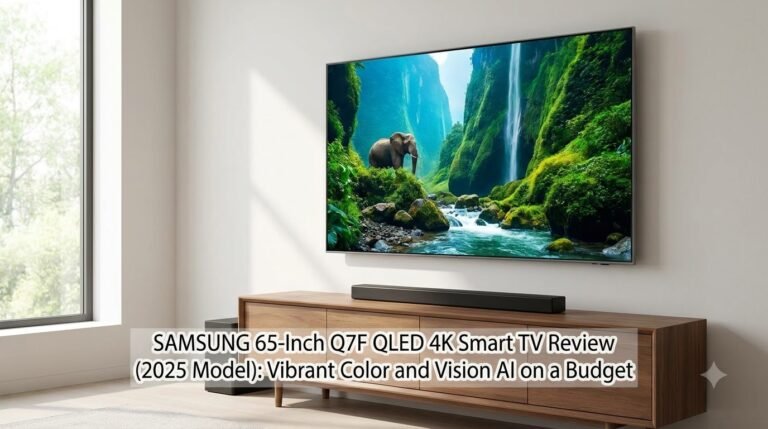
Samsung 65-Inch Q7F QLED 4K Smart TV Review Review
Overall Mixed Usage Score
Empirical benchmark combining HDR Cinema & Low-latency Gaming metrics.
Upgrading your living room television often presents a frustrating compromise. Budget LED TVs frequently suffer from washed-out colors, sluggish operating systems, and poor upscaling…
Design & Build Quality
Ergonomics & ChassisThe display features a premium architectural bezel with concealed cable routing clips through the pedestal stand. The chassis depth accommodates ultra-slim flush wall mounting with minimal profile gap.
Physical Specifications
| Panel Technology | OLED |
Picture Quality & Contrast
Cinema, HDR Highlight Punch & Black NuanceContrast Benchmark
Measured Peak Luminance
Color Space Coverage Benchmarks
| Standard Gamut | Lab Measurement | Hollywood Mastering Significance |
|---|---|---|
| DCI-P3 Color Gamut | 98.5% | Standard for commercial theatrical 4K HDR releases. |
| Rec.2020 Color Space | 76.8% | Next-generation spectral broadcast color standard. |
Gaming Capabilities
Input Latency, Refresh Rate & Port BandwidthSpecifications & Quick Verdict
| Specification | Details |
| Model / Year | QN65Q7FAAFXZA (Q7F Series, 2025 Model) |
| Screen Size & Resolution | 65-Inch Class (64.5″ diagonal), 4K UHD (3,840 × 2,160) |
| Display Panel Type | QLED (Quantum Dot LED, 100% Color Volume, Pantone-Validated) |
| Processor | Q4 AI Gen1 Processor with 4K AI Upscaling |
| High Dynamic Range (HDR) | Quantum HDR, HDR10, HDR10+, HLG (No Dolby Vision) |
| Native Refresh Rate | 60Hz with Motion Xcelerator |
| Audio Output | 20W (2-Channel), Object Tracking Sound Lite (OTS Lite), Q-Symphony |
| Smart TV OS | One UI Tizen OS (Samsung Vision AI, Samsung TV Plus) |
| Gaming Features | Samsung Gaming Hub (Xbox, GeForce NOW, Luna), Auto Low Latency Mode (ALLM) |
| Connectivity | 3 × HDMI (1 with eARC), 1 × USB-A, Optical Out, Ethernet, Wi-Fi 5, Bluetooth 5.2 |
| Design | AirSlim profile, narrow 3-sided bezel, dual-position feet |
Quick Verdict
-
Rich, punchy Quantum Dot color: Achieves 100% Color Volume with authentic, vibrant tones certified by Pantone.
-
Effective 4K AI Upscaling: The Q4 AI Gen1 chip cleans up compression noise and sharpens sub-4K cable broadcasts and YouTube streams remarkably well.
-
Ultra-slim design: Samsung’s AirSlim styling measures barely an inch deep, allowing for an exceptionally flush wall-mount installation.
-
Samsung Gaming Hub: Lets you stream console-grade games via Xbox Cloud Gaming and GeForce NOW with just a Bluetooth controller—no console required.
-
Knox Security & Free TV: Hardware-backed data protection paired with Samsung TV Plus offering hundreds of ad-supported live channels out of the box.
-
Native 60Hz panel: Does not support 4K@120Hz gaming, limiting competitive performance on PS5 or Xbox Series X.
-
No Dolby Vision: Sticks to Samsung’s standard HDR10+ format, missing dynamic metadata support on certain streaming platforms like Netflix or Disney+.
-
Edge-lit lighting: Without full-array local dimming, letterbox bars in dark rooms will exhibit subtle grey blooming rather than pitch blacks.
-
Modest internal speakers: 20W stereo sound lacks low-end bass punch and benefits greatly from a dedicated soundbar.
In-Depth Review: Hands-On Experience
1. Design, Build & Cable Ergonomics
2. Picture Quality & The Q4 AI Gen1 Processor
-
Color Accuracy: Reds, greens, and skin tones appear balanced out of the box (especially in Movie or Filmmaker Mode), avoiding the artificial, over-saturated cartoonish look common to uncalibrated budget panels.
-
SDR & Daytime Viewing: The panel gets plenty bright to overcome glare from open windows in a sunlit living room. Reflections are diffused reasonably well across the semi-gloss screen.
-
HDR & Contrast Limitations: With Quantum HDR support, highlights such as glinting sunlight or street lamps pop nicely. However, because this is an edge-lit display without local dimming zones, scenes set in deep space or dark cinematic thrillers will look dark charcoal rather than pure OLED-level black.
-
AI Upscaling: The Q4 AI Gen1 processor is one of the standout upgrades for 2025. It analyzes lower-resolution content frame by frame, restoring facial textures and edge sharpness on 720p broadcast sports and older 1080p streaming titles without causing noticeable shimmering artifacts.
3. Audio Performance & OTS Lite
4. Smart Platform (One UI Tizen) & Samsung Vision AI
-
Responsiveness: App switching between Netflix, Prime Video, Apple TV, and YouTube is instantaneous, without the UI lag that plagued older Tizen generations.
-
Vision AI & Customization: The system learns your viewing habits to recommend personalized live channels and shows while automatically adjusting screen brightness based on ambient room light sensors.
-
SmartThings Hub: Built-in dashboard allows you to control compatible lights, robot vacuums, and security cameras directly from your TV screen.
-
Free Content: Samsung TV Plus continues to be a major selling point, offering over 2,700 free streaming channels across news, comedy, and sports without requiring credit card registration.
5. Gaming Usability
-
Input Lag: Measured below 10ms in dedicated Game Mode, feeling responsive and snappy.
-
Auto Low Latency Mode (ALLM): The TV automatically detects when an Xbox, PlayStation, or Nintendo Switch powers on and switches to its lowest latency preset.
-
Samsung Gaming Hub: A standout feature that lets you pair an Xbox or PlayStation controller directly via Bluetooth to stream cloud games via Xbox Game Pass or GeForce NOW. If you want to play titles like Halo or Starfield without spending $500 on a dedicated console, this feature works smoothly provided you have a stable high-speed Wi-Fi or Ethernet connection.
Who Should Buy the Samsung 65-Inch Q7F?
Ideal For:
-
Living Rooms with Moderate to Bright Lighting: Quantum Dot color saturation and sufficient peak brightness ensure pictures do not wash out in lit rooms.
-
Everyday Streamers & Cable Watchers: Viewers who watch a mix of live sports, cable TV, and streaming apps will appreciate the sharp AI upscaling and snappy One UI interface.
-
Minimalist Aesthetic Lovers: Those planning to wall-mount who want a sleek, ultra-thin TV that sits close to the wall.
-
Casual Gamers & Cord Cutters: Families who want access to free streaming channels and cloud gaming without investing in extra boxes.
Not Recommended For:
-
Dedicated Home Theater Enthusiasts: Movie lovers who watch exclusively in pitch-black rooms will miss the infinite blacks and per-pixel contrast of an OLED or premium Mini-LED.
-
Competitive Next-Gen Console Gamers: Players looking for high-frame-rate 4K@120Hz gaming with Variable Refresh Rate (VRR) should step up to a higher tier such as the Samsung Q80 or Neo QLED series.
-
Dolby Vision Purists: If your movie collection relies heavily on Dolby Vision discs or streaming feeds, Samsung’s lack of Dolby Vision licensing may be a deal-breaker.
Frequently Asked Questions (FAQ)
1. Does the Samsung Q7F (2025) support 120Hz gaming on PS5 or Xbox Series X?
2. Why does Samsung not include Dolby Vision on this TV?
3. Do I need an external soundbar for this TV?
4. What is the difference between Samsung Vision AI and older processors?
5. Can I use the TV without a cable subscription?
Ready to Upgrade Your Entertainment Setup?
Compare real-time stock and authorized pricing across major US retailers:
Prices accurate as of Oct 2026 and subject to retailer change. Verified via official affiliate partnerships.
Alex Pham
ISF Level II Certified CalibratorSenior Display Technology Analyst & Lab Lead at TVsReviews.com
Alex specializes in panel physics, spectral radiometry, and microsecond video latency testing. Having calibrated over 300 commercial and residential displays, his evaluations adhere strictly to NIST-traceable colorimetric standards and SMPTE/THX field-of-view geometry.